Direct Answer
The durable business in Corey Ganim's playbook is not "make $1,000 an hour with Claude." It is a productized diagnosis: interview a small-business owner, document the work that consumes time, use AI to accelerate research and analysis, deliver a short recommendation report, and offer implementation only where the evidence supports it.
Corey describes a $999, 45-minute AI Tools Assessment that recommends three to seven off-the-shelf tools and promises a refund if he cannot identify at least five hours per week of opportunity. He then uses a review call to find out whether the owner wants to implement the recommendations alone or buy help. That is a clear consulting funnel. The income, conversion, time-saving, and client-volume numbers in the episode are Corey's reported results, not independently audited outcomes or promises that another consultant will reproduce them.
Credits: The offer, delivery system, acquisition methods, and AI Concierge case study come from Corey Ganim in conversation with Greg Isenberg. Follow Corey on X and Greg on X.
Source Note
This article uses the supplied transcript and original video as the primary creator source. Corey reports selling about 15 assessments in 2026 at the time of recording, seeing roughly half of clients request implementation, reaching $8,000 in monthly recurring revenue from an early AI Concierge offer, and closing five of his first six prospects. Those figures are useful case-study inputs, but they are self-reported and not independently verified here.
The market context was checked against current public sources. The U.S. Census Bureau reported in May 2026 that overall business AI use had reached roughly 17 to 20 percent, but fewer than 20 percent of firms with four or fewer employees reported using it. A separate Census working paper found that most AI-using firms still concentrated usage in only a few business functions. That does not prove every local business needs an assessment. It does support the narrower idea that many small teams have tools available without a mature adoption process.
Anthropic's small-business guidance makes an equally important point: a tool rollout still needs training, existing permissions, and human approval before consequential actions such as sending, posting, or paying. This article therefore treats the assessment as consulting work that requires judgment and controls. It rejects the idea that a person needs no qualifications simply because the recommended tools are easy to buy.
Link Map
| Resource | Status | Use it for |
|---|---|---|
| The $1,000/hour Solo AI Business | Primary creator source | Corey's four-phase assessment, report, upsells, customer-acquisition routes, and concierge case study. |
| Corey Ganim and his concierge write-up | Creator credit | Corey's public profile and his own explanation of the retainer model. |
| Greg Isenberg on YouTube, X, and website | Host credit | The original interview and Greg's startup and AI business coverage. |
| Corey's AI Audit Template and direct signup page | Email-gated creator resource | The assessment report template shown in the episode. It is a signup resource, not an open-source file. |
| Responsible AI Tools Assessment HTML | Free original companion | A fillable, printable JQ AI SYSTEMS edition with evidence fields, owners, permissions, assumptions, controls, and review dates. It is inspired by the assessment sequence Corey shared, but it is not Corey's file. |
| AI Problem-to-Solution Assessment | JQ AI SYSTEMS service | A fixed-scope paid assessment for one workflow: discovery, official-source research, up to three realistic options, one recommendation, a 30-day test plan, and a review call. |
| U.S. Census: AI use by businesses and working paper | Official market context | Adoption by business size, common business functions, and the difference between access and broad operational use. |
| Claude for Small Business | Official product guidance | Connectors, permissions, human approval, training, and commercial-data handling context. |
| Claude Design and setup guide | Official report tool | Create and export a branded presentation or PDF after the analysis is checked. |
| Fathom and privacy policy | Meeting capture | Record and transcribe a consented discovery call. Confirm client, account, retention, and regional requirements first. |
| Gamma | Alternative report tool | Corey's earlier report workflow and an alternative to Claude Design. |
| Futurepedia and There's An AI For That | Discovery directories | Generate a research shortlist, then verify every recommendation against the vendor's official site, pricing, security, and integrations. |
| Zapier, Make, and n8n | Implementation options | Build approved workflow automations after the process and permissions are defined. |
| Voxer and Notion | Retainer operations | Bounded asynchronous support and a maintained inventory of workflows, tools, owners, decisions, and next actions. |
| Prove business value and the AI services layer | JQ AI SYSTEMS guides | Move from tool knowledge to diagnosis, KPIs, implementation, training, and operational proof. |
Why This Offer Exists
A small-business owner usually does not want "AI transformation." They want fewer missed follow-ups, faster quotes, less copy-and-paste work, cleaner meeting notes, a more reliable handoff, or one report that no longer steals Friday afternoon.
The assessment works because it separates diagnosis from implementation. The owner pays for clarity. The consultant earns the right to recommend only after hearing how the business actually operates. That makes it more useful than a free sales call and less risky than proposing a large custom automation before the workflow is understood.
Corey's target in the episode is a small business with roughly two to 20 employees and reported annual revenue around $500,000 to $5 million. That is a positioning choice, not a universal qualification rule. A better client filter is whether the business has a repeated pain, enough volume for a measurable benefit, a decision-maker on the call, and the ability to adopt the recommendation.
| Good fit | Poor fit |
|---|---|
| A repeated workflow consumes several hours every week. | The owner wants a list of trendy tools with no business problem. |
| The team can explain the current process and provide examples. | The workflow is so rare that automation cannot repay setup and support. |
| A named owner can approve and test a change. | No one owns implementation, security, data, or training. |
| The result can be measured before and after. | The promised outcome depends on invented time savings or revenue. |
| The business accepts a narrow pilot before a large rollout. | The first engagement requires broad system access or regulated advice. |
Corey's $999 Model at a Glance
This graphic condenses the business model Corey described into one page: a fixed-price diagnosis opens the relationship, implementation services expand the engagement, and a bounded advisory retainer creates recurring support. It is a useful map of the offer, but the prices, conversion rate, time-savings guarantee, and implied hourly rates are Corey's reported positioning rather than universal benchmarks.
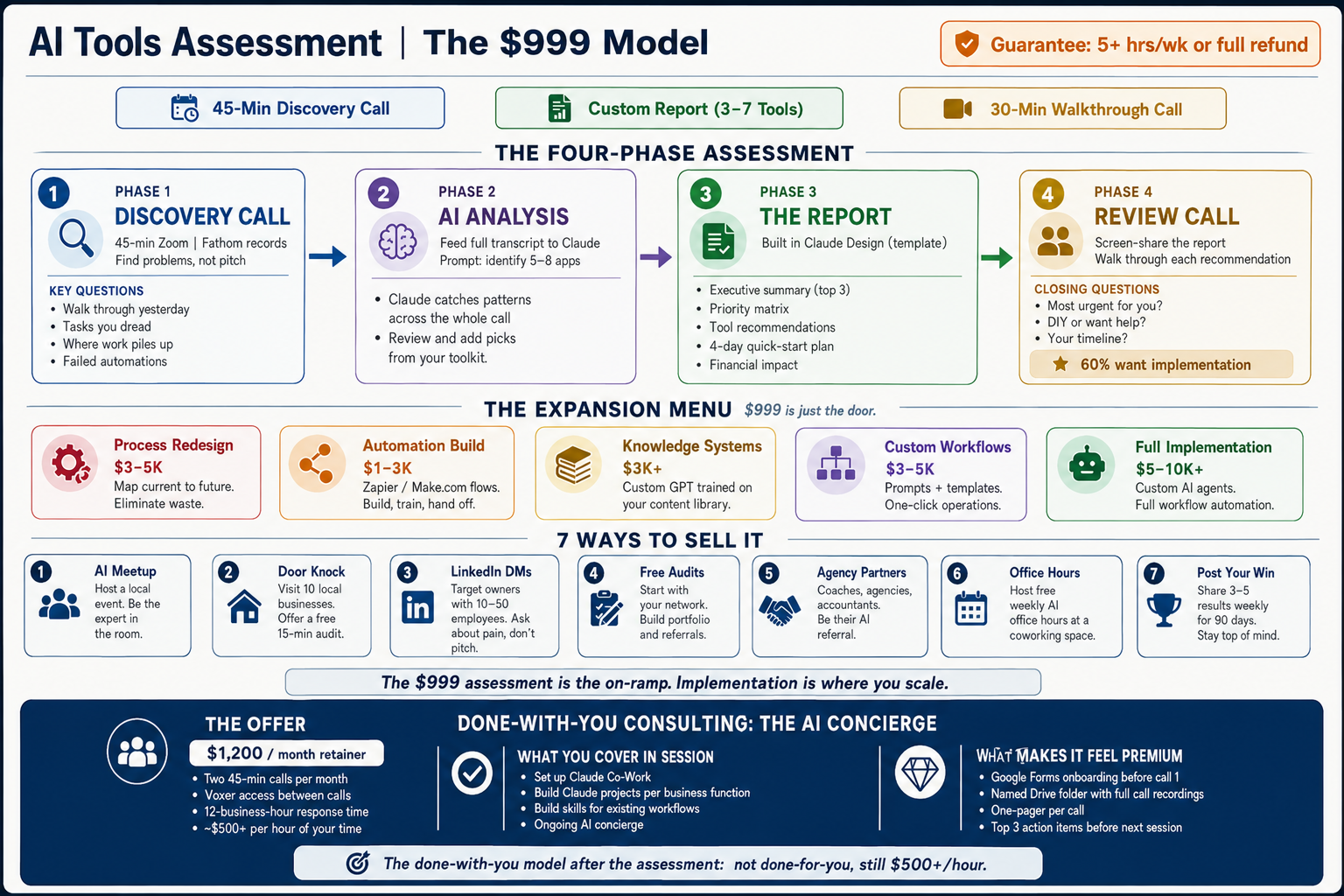
| Layer | What the graphic proposes | How to use it responsibly |
|---|---|---|
| 1. Entry assessment | A $999 package with a 45-minute discovery call, a custom report covering three to seven tools, and a 30-minute walkthrough. | Define the scope, recording consent, deliverables, revision limit, and refund measurement before the call. |
| 2. Expansion services | Process redesign, automation builds, knowledge systems, custom workflows, or full implementation priced separately. | Recommend only work supported by the diagnosis. Give every project its own statement of work, costs, permissions, owner, and success test. |
| 3. Client acquisition | Seven routes: local AI meetups, door knocking, LinkedIn outreach, free audits, agency partners, office hours, and publishing approved wins. | Choose one or two channels first. Keep outreach relevant and human-reviewed, obtain permission for case studies, and track qualified conversations rather than message volume. |
| 4. AI Concierge | A reported $1,200 monthly done-with-you offer with two 45-minute calls, bounded asynchronous support, and hands-on workflow coaching. | State response times, channels, exclusions, data rules, client cap, rollover policy, and what requires a separate implementation quote. |
The Four-Phase Assessment
- Discovery: run a 45-minute call, ask about the work, and record it only with consent. Do not prescribe tools while the evidence is still arriving.
- Analysis: redact the transcript, extract pain points, estimate frequency and time, research appropriate tools, and reject recommendations that do not fit the company.
- Report: turn the checked analysis into a short, branded, decision-ready document with priorities, costs, owners, risks, and a starting plan.
- Review: send the report in advance, walk through the recommendations, answer questions, and learn whether the client wants to implement alone or buy help.
The sequence matters. AI can accelerate transcription, pattern extraction, research, comparison, and presentation. It cannot take responsibility for the diagnosis. Corey gives a useful failure example: Claude suggested Salesforce to a four-person landscaping business. The consultant's job was to reject the enterprise-shaped answer and choose something proportional to the team.
Discovery Call Script
The first call should feel like operational research, not a demo. Ask for concrete examples and follow the work from trigger to completion.
# AI Tools Assessment discovery call

Opening
- I will ask about how work currently gets done.
- I will not recommend tools until I have reviewed the evidence.
- May I record and transcribe this call for the assessment?
- Who may access the transcript, and when should it be deleted?

Daily work
- Walk me through yesterday from the moment work started.
- What does a typical business day look like for you and the team?
- Which tasks do you dread, delay, or repeat?
- Where does work pile up or wait for one person?
- What is copied between email, documents, spreadsheets, and systems?

Evidence
- How often does this happen?
- How long does one instance take?
- Who does it, and who checks it?
- Show me one redacted example of the input and final output.
- What errors, delays, or missed opportunities does it create?

Previous attempts
- What have you tried to automate or improve?
- Why did it fail, stop, or never get adopted?
- Which tools are mandatory, prohibited, or already paid for?

Priority
- If you could delete one process with a magic wand, what would it be?
- What would make this assessment a clear win in 30 days?
- Who owns the decision, implementation, security review, and training?
Add the operational details the report will need: employee roles, existing subscriptions, integration constraints, data sensitivity, budget, implementation appetite, and a realistic decision date. If the client cannot provide a baseline, make baseline measurement the first recommendation rather than inventing a savings number.
A Copy-Ready Claude Analysis Prompt
This is a JQ AI SYSTEMS prompt built from the episode's workflow. It is not Corey's gated template. Use it with a redacted transcript and approved client context, then verify every output manually.
You are assisting with a small-business AI tools assessment.

INPUTS
- Redacted discovery transcript
- Business profile: industry, team size, region, revenue model
- Current tools and subscriptions
- Approved budget range
- Security, privacy, integration, and procurement constraints
- Any tools or data classes that are prohibited

TASK
1. Extract each pain point and cite the transcript evidence.
2. Map the current workflow from trigger to final review.
3. Estimate frequency, current human time, delay, error, and owner.
4. Mark every missing fact as unknown. Do not invent a baseline.
5. Research two or three off-the-shelf options for each viable pain point.
6. Use official product, pricing, security, privacy, and integration pages.
7. Reject tools whose complexity, cost, permissions, or maintenance do not
   fit the team. Do not recommend enterprise software to a small company
   merely because it is well known.
8. Score each option for impact, effort, setup time, monthly cost, risk,
   data access, reversibility, and required owner.
9. Select three to seven recommendations. Include a no-tool process change
   whenever it could solve the problem more simply.
10. For each recommendation, state:
    - pain solved and transcript evidence
    - current baseline and unknowns
    - expected outcome as a range, not a guarantee
    - setup steps and owner
    - recurring cost and maintenance
    - permissions and data involved
    - verification metric and review date
    - rollback or exit path
11. Create an effort-versus-impact matrix and a four-day quick-start plan
    requiring no more than 10 minutes per day from the client.
12. List assumptions, unresolved questions, and sources separately.

OUTPUT RULES
- Prefer the smallest reliable change.
- Do not fabricate customer stories, ROI, time savings, or compliance claims.
- Do not send, publish, buy, delete, or connect anything.
- The final recommendation remains subject to human review.
For the first few assessments, expect the draft to be incomplete. Corey says his early AI-generated reports were only about 60 to 70 percent useful. His improvement loop was to save better finished reports and use them as examples. That is sensible, provided client materials are isolated, permissioned, and never reused across clients without authorization.
The Client Report Structure
Corey says he iterated the report about 12 times and deliberately made it simpler. That restraint is the right instinct. A report is a decision surface, not proof that the consultant can fill 40 slides.
- Cover: client, date, business type, assessment scope, and confidentiality.
- Executive summary: the one or two constraints that matter, the primary lever, and the expected outcome range.
- Three value levers: effectiveness or revenue, efficiency or time, and quality or reliability.
- Effort-versus-impact matrix: place every recommendation on one visible page.
- Quick wins: the changes that can be tested with low risk and little setup.
- Recommendation cards: problem, evidence, tool or process, cost, setup time, owner, permissions, expected range, and proof metric.
- Four-day quick-start: four actions that take no more than ten minutes each from the client.
- Financial impact: a conservative range with assumptions, recurring cost, maintenance, and payback method.
- Decision page: do it yourself, buy implementation, or measure the baseline first.
weekly gross value = verified hours saved x agreed hourly value
monthly gross value = weekly gross value x 4.33
monthly net value = monthly gross value
                    - software
                    - maintenance
                    - added review or admin time

assessment payback months = assessment fee / monthly net value
Treat the formula as a model, not truth. Record who supplied each assumption and when it will be checked. Revenue impact should be separated from time savings. Time "saved" only has financial value when the business can redirect that capacity, avoid cost, improve service, or generate more output.
Claude Design can turn checked content into a branded deck or PDF, while Gamma is another option mentioned in the episode. Do not let visual polish hide weak evidence. The client should be able to trace every recommendation back to a real workflow and see which parts are estimates.
The Review Call and Honest Upsells
Send the report before the review call. Use the meeting to clarify decisions, not reveal a surprise sales deck. Corey's three closing questions are strong because they keep the client's agency visible:
- Which recommendation feels most urgent?
- Do you want to implement it yourself or would you like help?
- What timeline makes sense?
The implementation menu in the episode ranges from process redesign and automation to knowledge systems, custom workflows, and full delivery. The best first upsell is normally one narrow quick win with a measurable result.
| Offer | What the client receives | Boundary |
|---|---|---|
| Process redesign | Current-state map, unnecessary-step removal, future-state workflow, roles, and controls. | Fix the process before quoting automation. |
| Simple automation | One approved workflow built in Zapier, Make, n8n, or the client's stack, with testing and documentation. | Separate build scope, credentials, vendor costs, and ongoing support. |
| Knowledge system | Organized sources, permissions, retrieval rules, update owner, and an answer workflow. | Do not promise perfect recall or upload unapproved material. |
| Custom AI workflow | Instructions, examples, reference files, approval gates, evaluation cases, and team training. | A prompt or skill is not a production system without ownership and review. |
| Full implementation | Prioritized set of approved improvements with project management, rollout, training, and measurement. | Phase it. Do not turn the assessment into an open-ended transformation promise. |
| Maintenance retainer | Scheduled reviews, workflow updates, user support, model or vendor changes, and performance reporting. | Define call time, response window, channels, exclusions, rollover, and emergency work. |
The prices Corey mentions are examples from his offer, not universal market rates. Quote based on scope, risk, support, and value. If you credit the assessment fee toward implementation, make the credit and total price real and transparent. Do not inflate a package to manufacture a discount, and do not claim limited capacity unless it is genuinely limited.
Seven Ways to Find Clients Without an Audience
- Run a local AI-for-business meetup. Partner with a coworking space, teach one useful 20-minute workflow, answer questions, and follow up within 24 hours with the assessment only where it fits.
- Visit local businesses. Use short, respectful conversations to learn what owners struggle with. Corey's door-knocking conversion is a personal anecdote, not a benchmark. Follow local solicitation rules.
- Send relevant LinkedIn messages. Lead with local or industry context and one observed pain, not a pitch. A short personalized Loom can help, but volume never excuses irrelevant contact.
- Offer a small pilot to your existing network. Show one useful opportunity in exchange for honest feedback and permission to publish only the evidence the client approves.
- Build agency and adviser partnerships. Accountants, insurers, marketers, IT providers, and business coaches may see process pain first. Define referrals in writing and disclose incentives.
- Hold office hours. A recurring session at a coworking space can create trust without pretending every attendee needs a paid audit.
- Publish verified wins. Share the old process, new process, measurable result, and client-approved boundaries. Never invent testimonials, savings, scarcity, or case studies.
A practical first message is diagnostic: "I am researching where small [industry] teams lose time between [workflow A] and [workflow B]. Is that a problem for you, or is something else more painful?" The answer teaches you whether the niche has demand. It is more useful than sending 200 automated messages before you understand the problem.
The AI Concierge Retainer
Corey's favorite upsell is a done-with-you retainer rather than a fully managed automation service. The reported package includes two 45-minute calls per month, practical help using Claude and Claude Cowork, creation of skills or workflows, and asynchronous Voxer access with a 12-business-hour response window.
The first call connects approved tools, creates context and instruction files, schedules one bounded task, and teaches the client how the system works. Later calls use a memorable sequence:
- Audit: watch the current workflow and identify where time, quality, or decisions break down.
- Optimize: remove unnecessary steps and define the best human-and-AI process.
- Automate: encode the stable process as a skill, workflow, or integration with approval gates.
Corey also describes a Notion hub that records every workflow, tool, decision, and next action, plus an onboarding question: "What would make this a win in 90 days?" Those two details are what make the retainer more than office hours. The client receives a maintained operating system and a measurable direction.
The Honest Unit Economics
The episode's $1,000-per-hour headline comes from dividing a $1,500 monthly retainer by two 45-minute calls. The arithmetic is correct for direct call time. It is incomplete for the business.
headline direct-call rate
= $1,500 / 1.5 call hours
= $1,000 per direct call hour

fully loaded effective rate
= monthly collected revenue
  / (sales + discovery + prep + calls + async support
+ documentation + admin + rework + training + delivery)| Monthly time example | Hours |
|---|---|
| Two client calls | 1.5 |
| Preparation and follow-up | 1.5 |
| Asynchronous support | 2.0 |
| Documentation and client hub | 1.0 |
| Sales, admin, tools, and unallocated support | 2.0 |
| Total | 8.0 |
| Effective rate at $1,500 revenue | $187.50/hour before expenses and tax |
That can still be an excellent solo service. It is simply not the same as receiving $1,000 for every hour worked. Model utilization, lead flow, close rate, churn, client complexity, support behavior, payment collection, insurance, taxes, and idle capacity all change the result.
Corey reports testing monthly prices from $1,200 to $2,000, closing five of his first six prospects, reaching $8,000 MRR in ten days, and capping the roster at six. Treat those as his launch results. Build your forecast from a conservative close rate and real delivery time, not the best week in someone else's business.
Privacy and Delivery Controls
The assessment touches meeting recordings, internal processes, employee comments, customer data, software accounts, and potentially sensitive business information. The consultant should define the data boundary before pressing record.
- Obtain explicit recording and transcription consent from every participant.
- Explain the purpose, access list, storage location, model providers, and deletion date.
- Redact customer identities, credentials, financial details, health data, legal material, and unnecessary employee information.
- Use client-approved commercial accounts and verify provider training, retention, residency, and subprocessors.
- Keep one client per workspace or project; never use one client's material as another client's example without written permission.
- Use read-only or test access first. Do not connect email, payments, publishing, deletion, or customer-facing actions during diagnosis.
- Require human approval before anything is sent, posted, purchased, changed, or deleted.
- Document vendor subscriptions, renewal owners, permissions, rollback, and offboarding.
- Use written scope, terms, confidentiality, limitations, and professional advice where the jurisdiction or industry requires it.
This article is educational, not legal, privacy, tax, employment, or financial advice. Regulated businesses need qualified review. A tools assessment should never impersonate cybersecurity, medical, legal, accounting, or compliance expertise the consultant does not have.
A 30-Day Launch Plan
- Days 1-3: choose one industry and one repeated workflow you already understand. Interview three owners about the pain without selling.
- Days 4-7: build the discovery script, consent language, analysis rubric, report outline, data-retention rule, and a clear list of what the assessment does not include.
- Days 8-12: run one consented pilot at a reduced or no fee. Measure actual time, verify recommendations on official sources, and ask the client to challenge the report.
- Days 13-16: revise the template. Remove weak slides, add missing assumptions, and create a recommendation QA checklist.
- Days 17-21: publish one approved case study showing the workflow and evidence. Do not publish private screenshots, names, or invented results.
- Days 22-26: contact 20 relevant businesses or partners with a research-first message. Track replies, calls, objections, fit, and source.
- Days 27-30: sell one fixed-scope paid assessment, deliver it, and offer only the smallest implementation that can prove value in one to two weeks.
Bottom Line
Corey Ganim and Greg Isenberg surface a genuinely practical solo consulting model: charge for diagnosis, use AI to accelerate the analysis, keep the report simple, and let implementation emerge from the client's priorities. The assessment can stand on its own even when the client never buys the upsell.
The moat is not the Claude prompt or the slide template. It is the consultant's ability to ask better questions, reject an inappropriate tool, protect the client's data, map the process before automating it, and return later with proof that the recommendation helped.
The $1,000-per-hour headline is marketing arithmetic. The durable opportunity underneath it is quieter and better: become the person who can turn messy small-business work into a measured, proportionate, reviewable improvement.
Sources
- Corey Ganim and Greg Isenberg: The $1,000/hour Solo AI Business (Full Course)
- Corey Ganim on LinkedIn, Corey Ganim on X, and Corey's AI Concierge write-up
- Greg Isenberg on YouTube, X, and official website
- Corey Ganim: AI Audit Template and direct email-gated page
- JQ AI SYSTEMS: Responsible AI Tools Assessment companion HTML
- U.S. Census Bureau: What's Happening with AI Use Among Businesses?
- U.S. Census Bureau working paper: Business Use of Artificial Intelligence in the United States
- Anthropic: Claude for Small Business
- Anthropic: Claude Design and Claude Design setup guide
- Anthropic Privacy Center: custom data retention controls for Claude Enterprise
- Fathom and Fathom privacy policy
- Gamma
- Futurepedia and There's An AI For That
- Zapier, Make, and n8n
- Voxer, Notion, Loom, and Meetup