GPT-Live is not just a nicer voice skin for ChatGPT. It is OpenAI moving the interface from "send a turn, wait for a turn" toward live conversation.
The practical shift is simple: a voice model that can listen and speak at the same time makes AI feel less like a call center IVR and more like a person you can interrupt, pause with, redirect, or think out loud beside. That is a big deal for language learning, coaching, support, translation, sales roleplay, and any workflow where typing breaks the rhythm.
Official source: OpenAI's GPT-Live announcement, published July 8, 2026. This post treats OpenAI's announcement, Help Center, system card, and developer docs as the factual spine. The embedded YouTube videos are useful demos and commentary.
Source Note
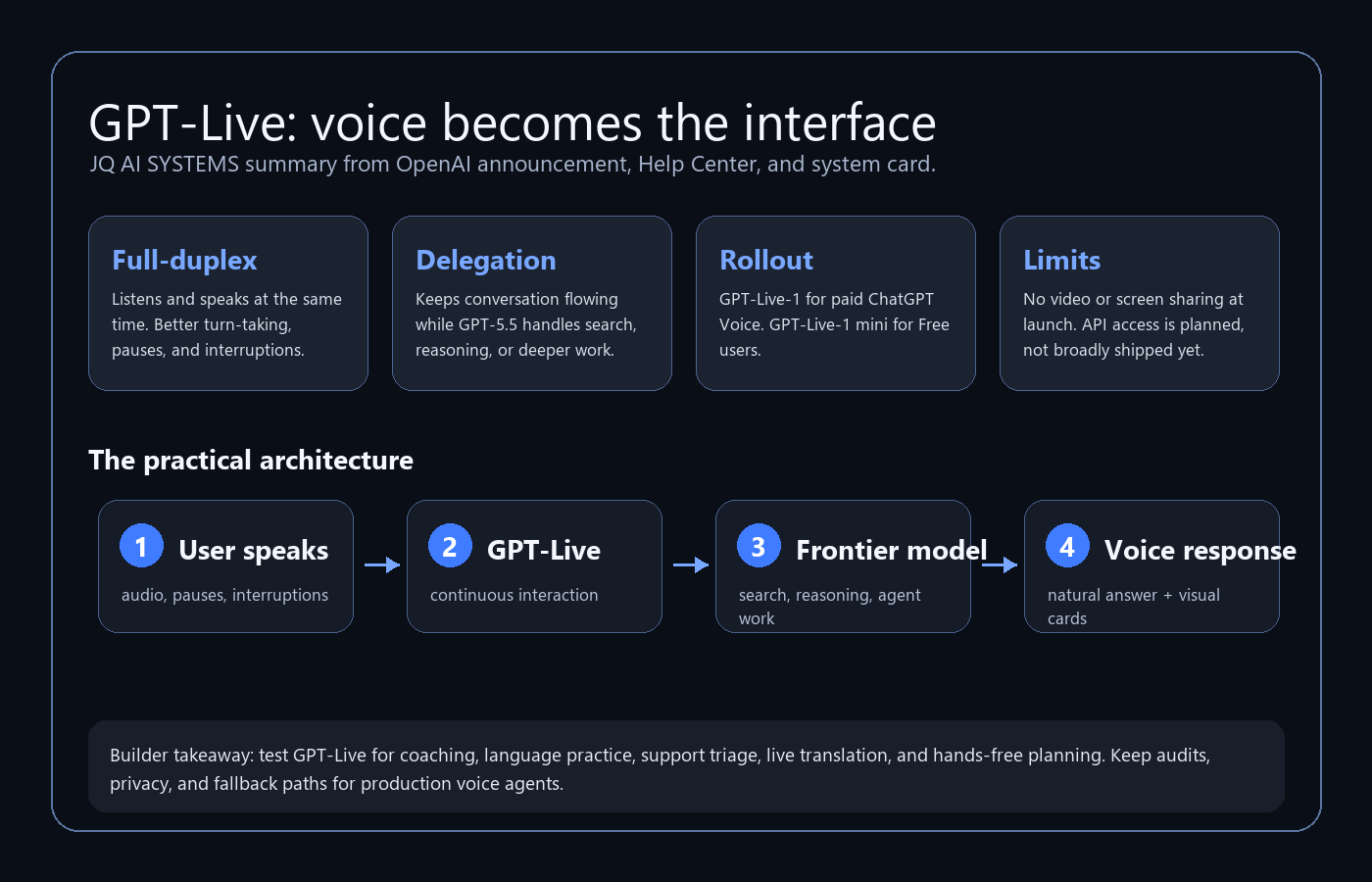
OpenAI says GPT-Live is a new generation of voice models powering ChatGPT Voice. The two launch models are GPT-Live-1 and GPT-Live-1 mini. The key architectural phrase is full-duplex: GPT-Live can process audio while it is speaking, decide whether to keep listening, pause, respond, or invoke deeper work, and keep the conversation moving.
Update, 24 July 2026: this launch-day availability note has changed. OpenAI now documents ChatGPT Voice in Work and Codex on the macOS and Windows desktop app, with paired iOS remote access for supported desktop work. See the newer Codex Voice workflow guide for current availability, permissions, usage, and tested workflows.
Link Map
| Link | Status | Builder takeaway |
|---|---|---|
| OpenAI: Introducing GPT-Live | Official announcement | Use this as the factual source for architecture, rollout, and launch claims. |
| GPT-Live system card | Official safety source | Read before using voice for emotional, teen, health, support, or high-risk workflows. |
| ChatGPT Voice Help Center | Official product support | Best source for plan availability, Voice modes, data controls, and current limits. |
| GPT-Live-1 API notification form | Official sign-up | Use this if you want API access when OpenAI opens GPT-Live to developers. |
| Realtime and audio docs | Developer docs | Use today for low-latency voice agents, translation, and transcription architectures. |
| Voice Agents guide | Developer docs | Choose speech-to-speech sessions for natural interaction, or chained pipelines for control and review. |
| Official GPT-Live video | Official video | Best first demo for the launch. |
| OpenAI Just Introduced The Future Of AI Voice | Commentary/demo | Useful for seeing how creators interpret the release. |
| Early access GPT-Live-1 demo | Commentary/demo | Useful for seeing hands-on reactions and rough edges. |
| Language learning and translation test | Commentary/demo | Useful because language learning is one of the clearest near-term GPT-Live workflows. |
What OpenAI Announced
OpenAI announced GPT-Live on July 8, 2026 as the new voice model layer powering ChatGPT Voice. The launch has three practical parts.
- GPT-Live-1 becomes the default ChatGPT Voice model for Go, Plus, and Pro users.
- GPT-Live-1 mini becomes the default ChatGPT Voice model for Free users.
- API access is planned, but not broadly available at launch. Developers and enterprises can sign up to be notified.
OpenAI also says more than 150 million people use ChatGPT Voice and Dictation each week, which is why this matters. Voice is not a side feature anymore. It is becoming one of the main ways people interact with models.
Why Full-Duplex Matters
Older voice interfaces usually work in one of two ways. Cascaded systems transcribe speech, send text to a model, then synthesize speech. Turn-based real-time systems are smoother, but still wait for the user to stop speaking before they respond.
GPT-Live changes the loop. It can listen while it speaks. It can acknowledge you without taking over. It can wait while you think. It can recover from interruptions. That sounds small until you try to use voice for real work.
In a typed workflow, a bad pause costs nothing. In voice, a bad pause kills the interaction. If the model interrupts too early, ignores a correction, or cannot handle overlap, people stop trusting it. Full-duplex is OpenAI's attempt to make the conversation layer feel alive enough for longer, messier, more useful sessions.
The Delegation Layer
The most interesting builder detail is not only the voice quality. It is delegation.
OpenAI says GPT-Live can handle the live conversation while delegating deeper work to frontier models in the background. At launch, that background model is GPT-5.5. In practice, that means the voice model can keep the conversation flowing while another model searches, reasons, or handles a more complex task.
This matters because it separates two jobs that should not always be the same job:
- Conversation control: listening, timing, interruption, tone, pacing, speech behavior.
- Deep work: reasoning, web search, analysis, agentic task execution, retrieval, tool use.
For builders, that is the right mental model. Voice should not just be text-to-speech glued onto a chatbot. A useful voice agent needs a fast conversation layer and a slower work layer, with clear handoffs between them.
What Builders Should Test
The tempting headline is "AI voice got human." The more useful question is: what workflows become easier when the model can listen, speak, and think in parallel?
| Workflow | Why GPT-Live helps | What to measure |
|---|---|---|
| Language practice | Natural interruptions, corrections, pacing, and live translation make practice less robotic. | Can the learner stay in the target language longer without frustration? |
| Sales roleplay | A live voice partner can interrupt, object, ask follow-ups, and simulate pressure. | Does the user improve objection handling and call structure? |
| Support triage | Voice can collect context while deeper reasoning searches docs or account state. | Time to resolution, escalation accuracy, and customer satisfaction. |
| Coaching and planning | People think out loud. Full-duplex makes the model a better listener during messy planning. | Does the session produce a usable plan, not just encouragement? |
| Hands-free research | The model can keep a conversation moving while background search happens. | Source quality, latency tolerance, and whether visual cards help. |
| Accessibility and mobility | Voice reduces typing friction for users who are driving, walking, cooking, injured, or visually overloaded. | Whether the interaction remains safe, accurate, and easy to exit. |
Limits and Safety
GPT-Live is a launch, not a finished operating system for voice agents.
OpenAI's current Help Center still says ordinary Live does not support video or screen sharing at launch, and Live is not available with custom GPTs. However, Voice can now operate inside Work and Codex on the ChatGPT desktop app using the tools and permissions of the selected experience. Availability still depends on plan, region, workspace settings, and app version.
The safety details also deserve attention. OpenAI's system card says GPT-Live has voice-native safety evaluations, red teaming, real-time safeguards, and monitoring. The model can steer or interrupt unsafe output and may end higher-risk voice conversations. OpenAI also says GPT-Live is designed for conversation, not impersonation, and uses predefined ChatGPT voices.
Data controls matter too. The Help Center says audio clips from Live and Advanced Voice conversations are retained with the chat transcript for 30 days, and audio/video clips are not used to train models unless the user opts into sharing them through data controls. Business users should still verify their own workspace policy before using voice for sensitive data.
Developer Angle
GPT-Live-1 is not the same thing as "voice agents in your product today." OpenAI says the GPT-Live API is coming soon. Until it is broadly available, the practical developer path is still the Realtime API and Voice Agents guide.
OpenAI's Voice Agents docs draw a useful distinction:
- Speech-to-speech sessions are best when the experience needs natural, low-latency conversation, barge-in, and real-time tool use.
- Chained voice pipelines are better when you want explicit control over transcription, text reasoning, policy checks, approvals, and speech generation.
That is the product decision. If you are building a language tutor or live assistant, start with speech-to-speech. If you are building healthcare intake, legal triage, regulated support, sales compliance, or anything that needs durable review, a chained pipeline may be safer because every stage can be logged and inspected.
Videos and Demos
Here are the requested videos in one place. The first is the official OpenAI launch video. The next five are additional OpenAI-style demo embeds supplied with the brief. The final three are hands-on commentary and testing videos.
Sources
- OpenAI: Introducing GPT-Live
- OpenAI Deployment Safety Hub: GPT-Live System Card
- OpenAI Help Center: ChatGPT Voice
- OpenAI: GPT-Live-1 in the API notification form
- OpenAI API docs: Realtime and audio
- OpenAI API docs: Voice agents
- Official GPT-Live launch video
- GPT-Live demo video
- GPT-Live demo video
- GPT-Live demo video
- GPT-Live demo video
- GPT-Live demo video
- OpenAI Just Introduced The Future Of AI Voice - GPT-Live
- OpenAI gave me early access to the new ChatGPT voice model
- GPT-Live for language learning and real-time translation