Sakana Fugu is not best understood as "a new Claude replacement" or "a new GPT replacement." The cleaner way to read it is this: Sakana is trying to turn model orchestration into a model.
You call one API. Behind that API, Fugu can decide whether to answer directly, delegate to another model, ask another agent to verify the work, or combine multiple specialist outputs into one response. That is why the launch is worth studying even if you never touch the API this week.
Source note
This post uses Sakana's official Fugu release, Fugu product page, console setup docs, and GitHub repo and technical report as the factual spine.
The video transcript, XYZ Labs writeup, and ExplainX analysis are useful commentary. Benchmark claims are framed as Sakana-reported unless independently verified.
What Sakana announced
Sakana announced Fugu on June 22, 2026. The headline is not just another large model. Sakana calls Fugu a multi-agent orchestration system as a single foundation model API.
From the outside, that means a developer can call one model. On the inside, Fugu can coordinate a pool of agents and models. Sakana says it handles model selection, task delegation, verification, and final synthesis internally.
The practical promise is simple: instead of building your own router across GPT, Claude, Gemini, local models, verifier agents, and specialist prompts, you send a request to Fugu and let the orchestrator decide which experts to use.
That has two possible advantages:
- Performance: some tasks are better solved by a team of models than by one model call.
- Resilience: if one provider changes access, pricing, or availability, an orchestration layer can route around some of the disruption.
The second point is part of Sakana's own pitch. After recent frontier-model access shocks, the single-vendor dependency problem is no longer theoretical for teams building serious AI workflows.
Fugu vs Fugu Ultra
Sakana launched two options: Fugu and Fugu Ultra. They share the same basic idea, but they are meant for different workloads.
| Model | Best fit | Tradeoff |
|---|---|---|
| Fugu | Everyday coding, code review, chatbots, Codex-style tools, and interactive work where latency matters. | Less aggressive orchestration than Ultra, but more practical for routine use. |
| Fugu Ultra | Hard multi-step work: research automation, paper reproduction, cybersecurity analysis, patent searches, and deep code review. | Higher cost and higher latency because deeper coordination is the point. |
One detail matters for teams with compliance requirements. Sakana says regular Fugu lets users opt specific agents or providers out of its pool. Fugu Ultra relies on its full fixed agent pool to deliver its performance, so the pool is not adjustable in the same way.
How multi-agent orchestration works
The simple version: Fugu is the conductor, not the orchestra.
A normal model call asks one model to solve the whole task. A hand-built multi-agent system asks the developer to write the routing logic: planner, coder, verifier, researcher, critic, tool user, final editor. Fugu tries to internalize that coordination.
Sakana says Fugu itself is a language model trained to call models in an agent pool, including recursive calls to itself. That means the routing is learned rather than just a fixed if/else rule tree.
In a serious workflow, that could look like:
- Read the user request and decide whether one model can handle it.
- Break the task into subtasks if needed.
- Send coding, research, reasoning, or verification subtasks to different agents.
- Compare outputs and ask for a second pass when something conflicts.
- Synthesize the final answer into one response.
For builders, the important question is not whether this sounds elegant. The question is whether it reduces the total number of prompts, retries, mistakes, and manual review minutes on the actual work you run.
Benchmarks in context
Sakana reports strong benchmark results for Fugu Ultra across coding, science, reasoning, and agentic tasks. The chart is worth looking at, but it should not be read as a permanent ranking of every model.
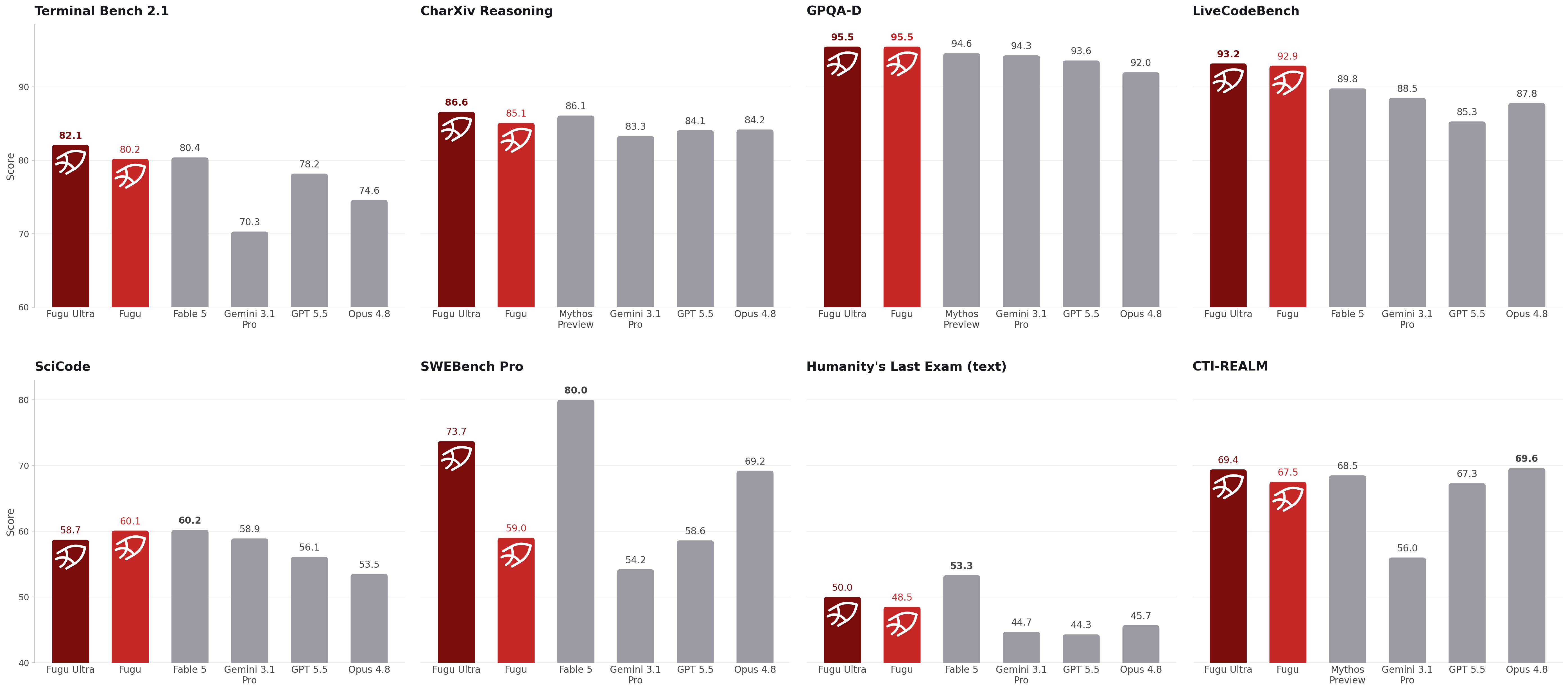
There are three caveats I would keep in the margin:
- Provider baselines: Sakana notes that non-Fugu scores are reported by the model providers.
- Evaluation conditions: results depend on harnesses, prompts, tool budgets, model versions, and scoring rules.
- Workflow fit: a model can win a benchmark and still be the wrong choice for your latency, privacy, or cost constraint.
The useful takeaway is more modest and more interesting: orchestration is now credible enough to compare against frontier models on the hard tasks builders care about.
Cost and when it is worth it
As of June 22, 2026, Sakana lists subscription tiers that include both Fugu and Fugu Ultra:
- Standard: $20/month for lightweight daily use.
- Pro: $100/month with 10x Standard usage.
- Max: $200/month with 20x Standard usage.
Sakana also lists pay-as-you-go pricing. For Fugu, they say you are charged based on the underlying top-tier model involved, and they do not stack model fees when multiple agents are active. For fugu-ultra-20260615, Sakana lists:
- Input: $5 per 1M tokens, or $10 when context is above 272K tokens.
- Output: $30 per 1M tokens, or $45 when context is above 272K tokens.
- Cached input: $0.50 per 1M tokens, or $1.00 when context is above 272K tokens.
That is not "cheap mode." It is "use this when orchestration saves enough retries or mistakes to justify itself."
My rule of thumb:
- Use a cheaper direct model for quick edits, summarization, draft copy, routine code, and lightweight Q&A.
- Use Fugu for interactive coding, code review, and workflows where you want orchestration without going full Ultra.
- Use Fugu Ultra for long-horizon work where a better first completed result is worth more than raw token savings.
The metric is not dollars per token. It is dollars per accepted result.
How to get started
There is one big availability caveat: Sakana's product page says Fugu is not yet available in the EU/EEA while they work toward GDPR and regional compliance. Since JQ AI SYSTEMS is based in Portugal, treat the setup below as preparation unless your account has access from an eligible region.
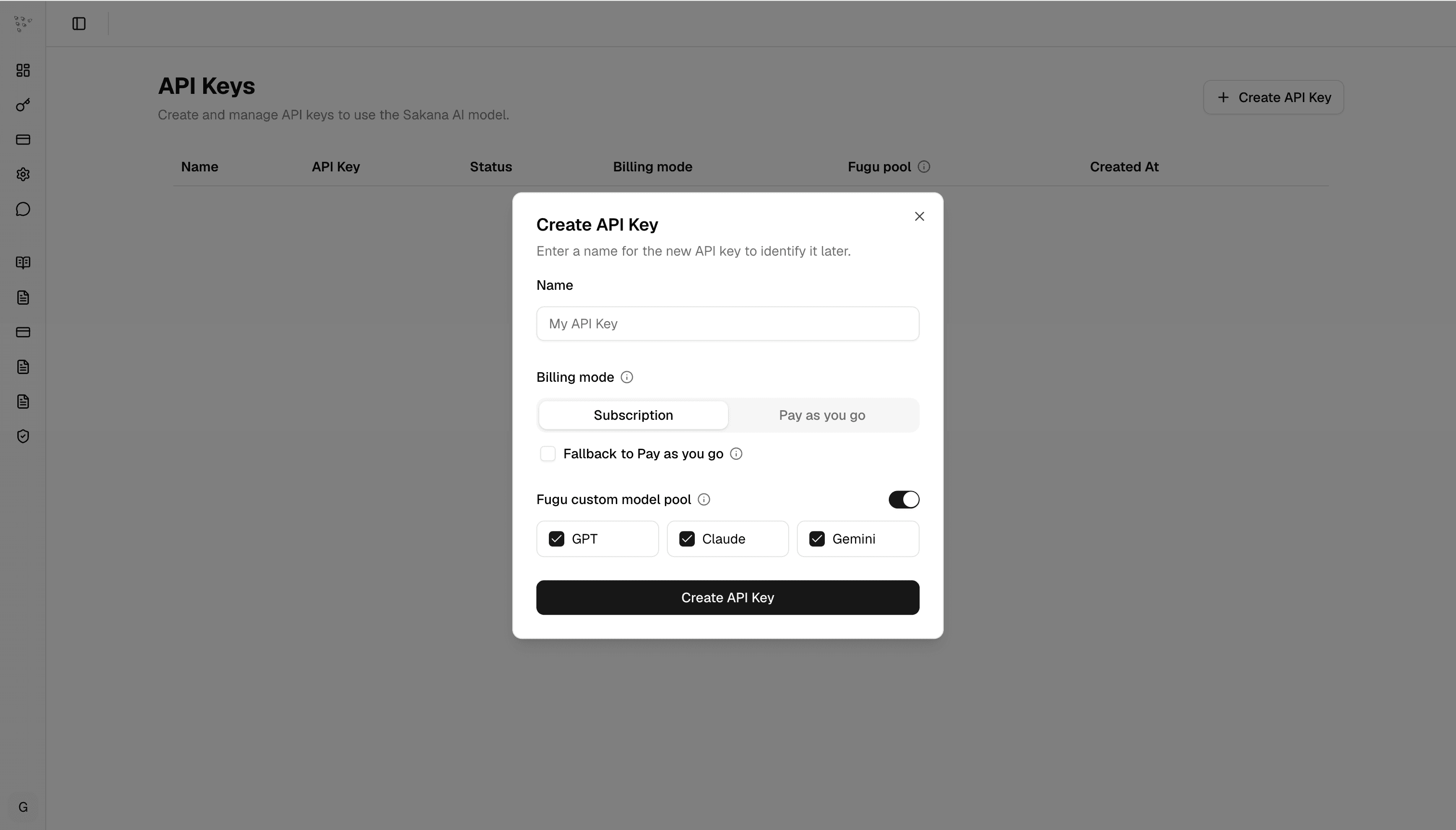
Sakana's get-started docs show the API base URL:
https://api.sakana.ai/v1Their OpenAI SDK example points the OpenAI client at Sakana's base URL:
from openai import OpenAI

api_key = "YOUR_API_KEY"

client = OpenAI(
    base_url="https://api.sakana.ai/v1",
    api_key=api_key
)
Sakana also documents a Codex setup path:
curl -fsSL https://sakana.ai/fugu/install | bash
codex-fugu
The one-line Codex install is documented for Ubuntu and macOS, with Windows users pointed toward manual setup. The models shown in the docs include fugu and fugu-ultra.
What builders should test first
If you get access, do not start with a generic benchmark prompt. Test work where orchestration should matter.
- Deep code review: ask Fugu Ultra to review a real PR against project rules, then compare it with your normal review model.
- Paper or repo reproduction: give it a bounded implementation task with clear success criteria.
- Research synthesis: ask it to compare several technical options and produce a decision memo with risks.
- Security analysis: use a legal, scoped target and require evidence, retest steps, and non-destructive behavior.
- Patent or market scan: test whether multi-agent search and synthesis saves human review time.
Score the run with practical criteria:
- Did it finish with fewer follow-up prompts?
- Did it catch issues your usual model missed?
- Did it hallucinate less, or just sound more confident?
- Did the latency feel acceptable?
- Was the final result cheaper than doing the same work with retries on a single model?
- Can the workflow tolerate the agent pool and region availability constraints?
The best use case for Fugu Ultra is not "answer my quick question." It is "coordinate enough expertise that I can trust this long, messy workflow with less human babysitting."